Supply Chain Orchestrator 26.3.1
This release focuses on faster receiving with AI Label Scan to Package, smoother WMS workflows, improved automation, and better platform performance. We’ve also added practical enhancements for Warehouse Receipts, Cargo Releases, workflow tokens, thumbnails, and document security.
What’s New?
Warehouse Management System — AI Label Scan to Package
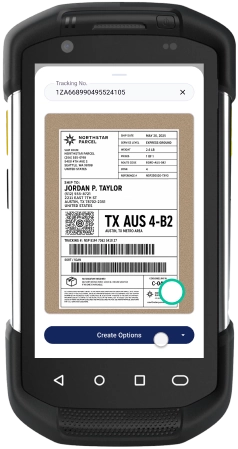
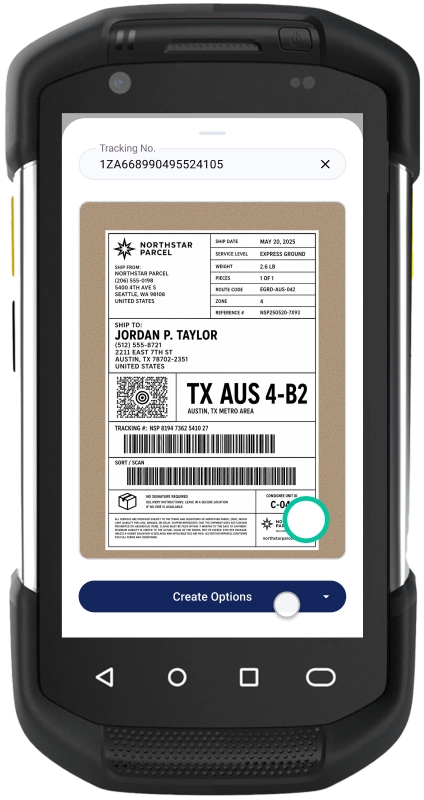
We’ve released AI Label Scan to Package, a new AI-powered capability that helps teams create packages faster during the receiving process.
With this feature, users can take a picture of a package label using the Orchestrator WMS Mobile App. Orchestrator then extracts key information from the label and uses it to help create the package.
The system can also map captured data to existing records, such as the shipper, consignee, and carrier. If a record does not already exist, Orchestrator can populate the information into the creation form so the user can review it and create it.
- Scan package labels with AI: Take a picture of a package label and let Orchestrator extract key package information.
- Reduce manual data entry: Avoid retyping information from labels during receiving.
- Map data to existing records: Automatically match captured information to existing shippers, consignees, and carriers.
- Create missing records faster: If a related record does not exist, Orchestrator pre-fills the creation form for user review.
- Speed up receiving: Help warehouse teams create packages faster and keep freight moving.
- Reduce data entry errors: Minimize mistakes caused by manual typing or repeated entry.
Example use case:
A warehouse employee receives several packages and needs to create package records quickly. Instead of manually typing information from each label, they open the Orchestrator WMS Mobile App, take a picture of the package label, and let AI Label Scan to Package extract the key details. Orchestrator maps the information to existing records or pre-fills new record forms when needed. The employee reviews the information, creates the package, and moves to the next one faster.
Enhancements
Warehouse Management System Improvements
We’ve added several improvements to make daily warehouse tasks faster and easier.
- New Warehouse Receipt list columns: Users now have more column options for flexible Warehouse Receipt list views.
- Clone Cargo Releases: Users can now clone Cargo Releases to save time when creating similar records.
- Create entities from Warehouse Receipts: Users can create related entities (shippers, consignees, etc.) directly from a Warehouse Receipt.
- Open full company and contact records from Warehouse Receipts: Users can now access complete company and contact records directly from the Warehouse Receipt.
- Default unit of measurement: Admins can now set a default unit of measurement to help standardize data entry.
- Edit multiple Warehouse Receipt custom records at once: Users can update multiple Warehouse Receipt custom records in one action.
- Faster continuous package creation: Users can create packages more efficiently from the Package list without unnecessary steps.
- Create a Warehouse Receipt from WMS Mobile App package creation: Mobile users can now create a new Warehouse Receipt while creating a package.
Example use case:
A receiving team needs to process multiple inbound packages for a customer. They can create or access related entities from the Warehouse Receipt, use default units of measurement, create packages faster from the Package list, and even create a Warehouse Receipt from the mobile app when needed. This reduces back-and-forth and keeps the receiving process moving.
Workflow Improvements
We’ve added workflow enhancements that give teams more flexibility and better automation control.
- Workflow branch re-enrollment: Contacts or records can now re-enter a workflow branch when the conditions are met again.
- New workflow tokens: New tokens are available for tasks and email notifications, helping teams create more useful automated messages and task instructions.
Example use case:
A workflow is set to notify a team when a condition is met. If that condition becomes true again later, the record can re-enter the correct branch. This helps teams automate repeat scenarios without manually restarting the process.
Platform Performance and Security Improvements
We’ve also improved platform performance and added new protections for documents and attachments.
- Faster image and video thumbnails: Image and video thumbnails now load faster across the platform.
- Document and attachment security enhancements: New security improvements help better protect documents and attachments stored in Orchestrator.
Example use case:
A user reviewing package photos, videos, or attached documents can load thumbnails faster and work with files more smoothly. At the same time, the platform adds stronger protection for stored documents and attachments.
Other Product Updates & Release Notes
