
Warehouse Technology WMS for Small Business: 5 Things to Consider Before Buying
Explore the key factors small businesses should consider when choosing a warehouse management system, including pricing, implementation, core features, cloud access, integrations, and long-term scalability.
Table of Contents
SHARE ON SOCIAL MEDIA


Selecting a WMS system for a small business is an important decision that should not be taken lightly. The outcome of this decision will have a direct impact on the efficiency and effectiveness of warehousing operations and the business as a whole.
Selecting a system is not only a matter of efficiency and productivity but also of competing for and retaining customers. In today’s technological environment, customers expect more convenience and data sharing from their logistic service providers.
On the other hand, the system should also be able to provide the management team with accurate and timely information to support the decision-making process and react on time to market changes.
In this article, we will discuss specific features that a warehouse management system must have to effectively compete in the market, as well as general points that must not be ignored. The goal is to implement a system that becomes an asset to the company.
5 Things to Consider When Choosing a WMS for Small Business
Choosing the right system involves more than comparing features. A WMS for small business should fit your current operations, budget, technical requirements, and growth plans without adding unnecessary complexity. The following five considerations can help you evaluate your options and identify the best fit for your warehouse.

1. Off-the-Shelf Software
In today’s software environment, there is no need to build a warehouse management system unless your business has non-standard warehousing operations or requirements that cannot be fulfilled by a vendor.
Research indicates that the cost of building a functional system ranges between $500,000 to a million dollars, and the most advanced systems have consumed up to $25 million or more.
But if your business has standard warehouse operations, there are plenty of “Off-the-Shelf Software” ready to be deployed with minimal to no customization.
A simple Google search for “Buy WMS Software” will give you many options and sites to compare systems and vendors. The two most common sites to review vendors & software are Capterra.com and Softwareadvice.com.
Before comparing individual systems and vendors, it helps to understand the different types of WMS and how their functionality, complexity, and connectivity differ.
If you’re unsure which system is best for your business, hire a consultant to help you make an informed decision.
2. Flexible Pricing Model
One of the most common financial challenges for small businesses is cash flow. That is why it is so important to look for a warehouse management system with a licensing model that adjusts to the company’s financial needs at any given time.
A flexible pricing model charges based on either transaction, per-user, or system functionality and does not require any form of contractual agreement.
It is very important to carefully analyze each vendor independently. Some vendors mitigate the risk of potential revenue loss by either locking the customer in a contract or charging nickels and dimes for every functionality in the system. Avoid these vendors at all costs.
The name of the game here is cost elasticity in the pricing model, not being locked in a contract and being able to pay every month for the things that you need and use.
3. Easy Implementation & Low Operating Costs
Small businesses should focus on acquiring and retaining customers, not spending significant money and time implementing and maintaining a WMS system. As shown by softwareadvice.com the implementation of a system can range between $4,023 and $50,000.
Average Implementation Budgets by Annual Revenue (in Millions)

Source: How 3PLs Budget for Warehouse Solutions
With the advent of cloud computing and third-party technology providers, small organizations should consider a cloud-based solution and leave the management & maintenance of the system to the experts.
Take advantage of SaaS (Software-as-a-Service) WMS solutions hosted in the cloud. These solutions don’t require implementation or hardware investment and can be accessed from anywhere with an internet connection.
Learn more about WMS SaaS, including how cloud deployment, subscription pricing, scalability, maintenance, and vendor selection should factor into your decision.
Because you still need reliable internet & network connections, it’s important to set up a network and internet infrastructure that is reliable. You want to make sure that you have some form of network failover or redundancy so that if one network device (or the internet) fails, your business is not affected, or at least the downtime is minimal.
4. WMS Core Functionalities
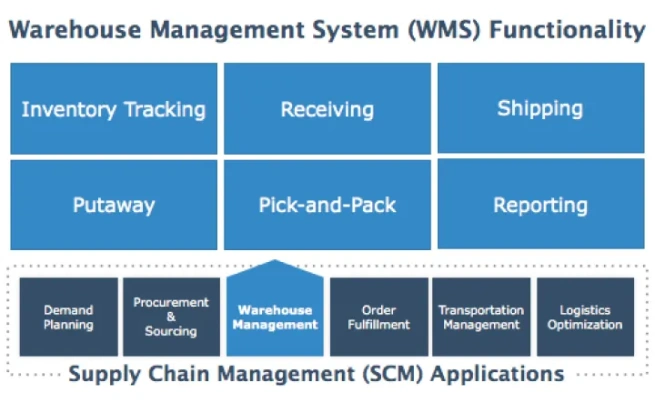
At the very least, a warehouse management system must support the most basic warehousing processes: Receiving, Put-away, Pick-and-Pack, Inventory Tracking, Shipping & Reporting. The system must offer technologies to make these processes efficient and help reduce the likelihood of errors.
Receiving: From a receiving perspective, the system must be able to log any cargo received in the warehouse and generate a warehouse receipt & proper label(s).
Put-away: The system must guide the warehouse clerk to the right location to store the cargo.
Pick-and-Pack: In this case, the company needs to evaluate which picking process it uses the most (full pallet picking, batch picking, carrier picking, etc.) and find a system that supports it.
Inventory Tracking: The most basic system must offer the ability to effectively track inventory in the warehouse.
Shipping: From a shipping perspective, the system must, at the very least, be able to generate itemized bills of landing, packing lists, and invoices.
Reporting: Reporting capabilities are a must for any system, but the type of reports required depends on the business itself. In general, the system must be able to report inventory, inbound and outbound efficiency, and labor costs.
5. Technological Capabilities
Many small and mid-size warehouses have adopted many of the following technologies, but a lot others haven’t. These technologies must not be ignored or left out when deciding on a warehouse management system. If a system doesn’t support them, then most likely this is not the best solution for your business.
The following solutions have become the very basic standard solutions used to increase warehousing operational efficiency and reduce errors.
Barcode Scanners. Critical in automating the data collection process during the receiving, put-away, pick/packing, shipping and inventory process. Barcode scanners are also critical in reducing data entry errors.
Barcode Label Printer. Labeling in a way is the backbone of the supply chain industry. Barcode label printers complement barcode scanners in data collection across most processes in the warehouse.
Reliable Database. These systems collect and retrieve fairly large amounts of data. As a result, this data must be stored not in folders and files, but in a database. Now there are multiple different types of databases. Make sure the system you are considering runs on a reliable, industry standard database. Examples of reliable, standard databases include: Microsoft SQL & MySQL.
Application Program Interface (API). We previously talked about how customers are increasingly expecting to exchange information more efficiently and effectively with their logistic providers – APIs are critical here. They provide a gateway for systems to connect/integrate and exchange information with each other without human intervention.
When to Invest in a WMS for Small Business
A small warehouse may be able to manage operations with spreadsheets and basic inventory tools at first. However, those methods can become difficult to maintain as order volume, inventory, customers, and warehouse activity increase.
It may be time to invest in a WMS for small business when:
- Inventory errors and misplaced items are becoming more frequent.
- Receiving, picking, packing, or shipping relies heavily on manual data entry.
- Employees spend too much time searching for inventory or updating spreadsheets.
- Customers regularly request shipment, inventory, or order-status updates.
- Managers lack timely reports on warehouse activity and performance.
- The business is adding customers, users, locations, or transaction volume.
- Existing systems cannot connect warehouse data with other business platforms.
A WMS should not only solve current problems. It should also provide the visibility, control, and scalability needed to support future growth without forcing the business to replace the system too soon.
A Scalable WMS for Small Business
Supply Chain Orchestrator’s Cloud Warehouse Management System gives small and growing logistics operations a centralized way to manage receipts, packages, inventory, orders, tasks, shipments, documents, and reporting. Its cloud-based structure helps businesses access warehouse information without maintaining an on-site software environment, while built-in integrations and open API access support connections with other business systems.
Businesses can begin with the WMS capabilities they need today and expand the platform as their operations grow. Connected modules include Workflow Automation, WMS Mobile App, Warehouse Dimensioner, Customer Portal, and Supply Chain CRM, helping businesses extend automation, mobile execution, dimension capture, customer self-service, and sales management as their operational needs grow.
Conclusion
You now have the information needed to choose a WMS for small business that can help your operation compete today and scale more effectively in the future.
Look for an off-the-shelf solution with a flexible and transparent pricing model, preferably one that is cloud-based and accessible through a modern web browser. Just as importantly, confirm that the system supports your core warehouse processes, integrates with the technologies your team relies on, and can grow with your business.
Ready to see whether a cloud WMS fits your operation? Schedule a demo to explore how Supply Chain Orchestrator can help you centralize warehouse activity, improve operational visibility, and support long-term growth.
For more warehouse management, logistics software, and technology insights, follow us on LinkedIn and subscribe to our YouTube channel.
Frequently Asked Questions About WMS for Small Business
1. What is a WMS for small business?
A WMS for small business is software that helps manage warehouse activities such as receiving, put-away, inventory tracking, picking, packing, shipping, and reporting. It can reduce manual work, improve inventory visibility, and provide greater control over daily operations.
2. When should a small business invest in a WMS?
A small business should consider a WMS when spreadsheets and basic inventory tools can no longer support its warehouse activity. Common signs include frequent inventory errors, increasing order volume, excessive manual data entry, limited reporting, and difficulty finding or tracking goods.
3. What features should a small business WMS include?
At a minimum, the system should support receiving, put-away, inventory tracking, picking and packing, shipping, and reporting. Businesses should also consider barcode scanning, integrations, mobile access, security, workflow automation, and scalability based on their operational needs.
4. Is a cloud WMS suitable for a small business?
A cloud WMS can be a practical option for small businesses because it reduces dependence on on-site servers and can be accessed through an internet connection. However, businesses should still consider implementation, integrations, training, warehouse devices, internet reliability, and ongoing subscription costs.
5. How much does a WMS for small business cost?
The cost varies based on the pricing model, number of users and locations, required functionality, transaction volume, integrations, implementation, training, hardware, and support. Businesses should compare the total cost of ownership rather than evaluating the subscription or license price alone.

Written by