Supply Chain Orchestrator 26.1.1
This release focuses on three big areas: visual rack-level inventory clarity, cleaner accounting updates through QuickBooks sync, and faster day-to-day execution with reusable note templates and better communication tracking. We’ve also added a few practical WMS enhancements that remove friction in common workflows.
What’s New?
Warehouse Management System — Rack Visualization
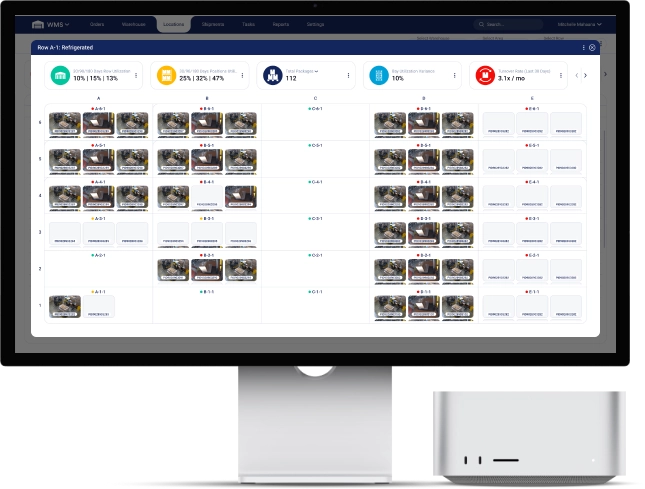
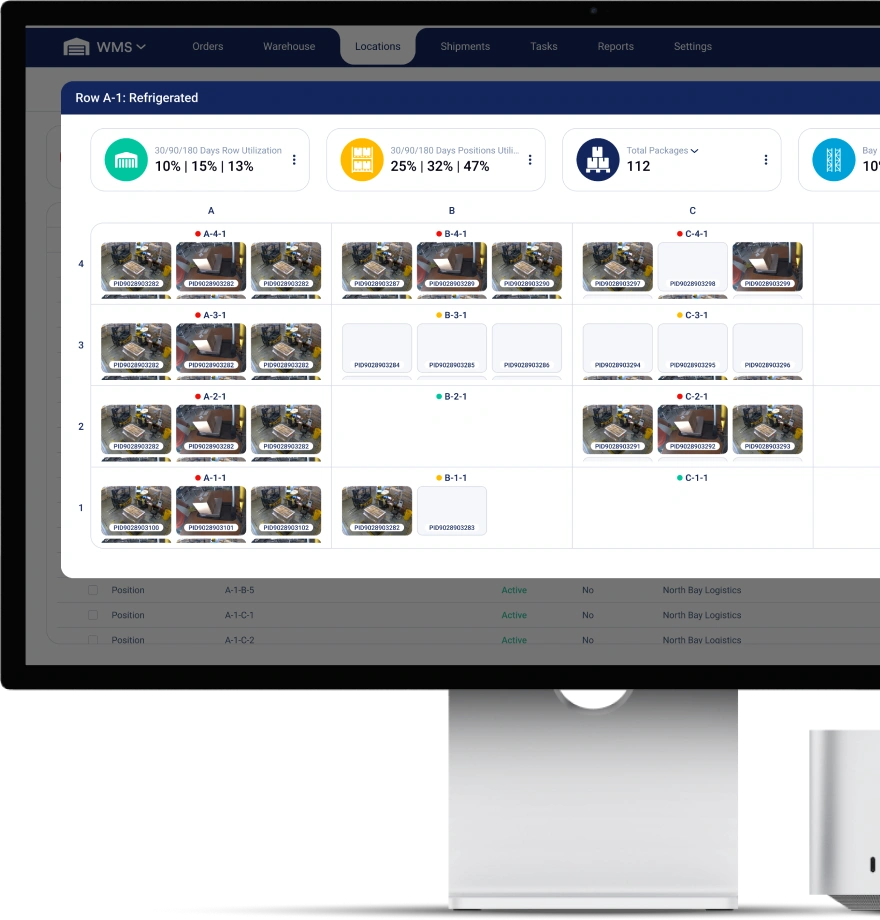
We’ve released Rack Visualization so teams can see rack positions and sub-positions visually—along with cargo images, key cargo details, and how much space each slot is using.
- Visual rack layout: View an accurate depiction of a rack, including all positions and sub-positions.
- Position Utilization: When a position contains Packages/Repack, utilization is calculated using the position dimensions and the package dimensions, helping teams identify underused or overfilled space faster.
- Cargo image preview per slot: See a preview image of the cargo stored in each position/sub-position.
- Enlarge images on click: Click any cargo image to open it enlarged in a pop-up.
- Cargo details per position: View key information for what’s stored in each slot (for example, which Warehouse Receipt is tied to that position).
Example use case:
A warehouse employee wants to confirm where a customer’s freight is stored and whether there’s room to place additional cargo in the same rack. With Rack Visualization, they open the rack view, see the images of what’s currently stored in each slot, click to enlarge any image for verification, and review utilization per position to decide where the next package should go—without walking the aisle or guessing.
Accounting — Update Bills in WMS and Sync to QuickBooks
You can now update Bills directly in Orchestrator, and those changes will be reflected in QuickBooks.
- Update bills from WMS: Make changes inside Orchestrator without logging into QuickBooks.
- Keep systems aligned: Reduce double entry and keep bill records consistent across platforms.
Example use case:
An operations manager notices a vendor bill needs a correction after the receiving team closes the job. Instead of switching tools, they update the bill in Orchestrator and the corrected details sync back to QuickBooks—keeping accounting accurate with less back-and-forth.
Communication — Send Emails from Operational Records
You can now send emails directly from key records so communication stays organized and traceable under the right activity.
Supported records: Consolidations, shipments, cargo releases, pickups & Deliveries
This helps teams keep conversations tied to the correct transaction and makes audits and follow-ups easier.
Example use case:
A customer requests a POD and an updated ETA. The operator sends the email directly from the Pickup & Delivery record so the message is logged with the activity and anyone on the team can see the full communication history later.
Productivity — Note Templates
You can now create Note Templates in the Admin module and reuse them across common workflows.
- Faster note entry: Select a template and the note content auto-fills—no retyping the same notes.
- Available across: Warehouse Receipts, packages, shipments, consolidations, cargo Releases, pickups & deliveries, purchase orders, sales orders
Example use case:
A team uses standard notes like “Customer notified — awaiting approval” or “Photos added — verify cartons on arrival.” Instead of rewriting them each time, users select the template and move on, keeping notes consistent across the operation.
Enhancements
Warehouse Management System Improvements
We’ve added a few practical improvements that reduce friction in daily tasks:
- Print labels without a Warehouse Receipt: Users can now print package labels even when a package is not associated with a Warehouse Receipt.
- Enlarged image pop-up from Packages: When users click an image on a Package, it now opens enlarged in a pop-up for easier viewing.
Other Product Updates & Release Notes
