
Supply Chain Orchestrator 25.11.2
This release focuses on three big areas: capturing rich cargo evidence from the WMS Mobile App, adding smarter branching logic to Warehouse Workflows, and introducing Bookings for Air, Ocean, and Inland moves. We’ve also made reporting and WMS operations smoother with new calculations, timelines, filters, and payment options—helping teams work faster, reduce disputes, and keep data cleaner across the platform.
What’s New?
Mobile App — AttachIT for Cargo Photos, Videos & Documents
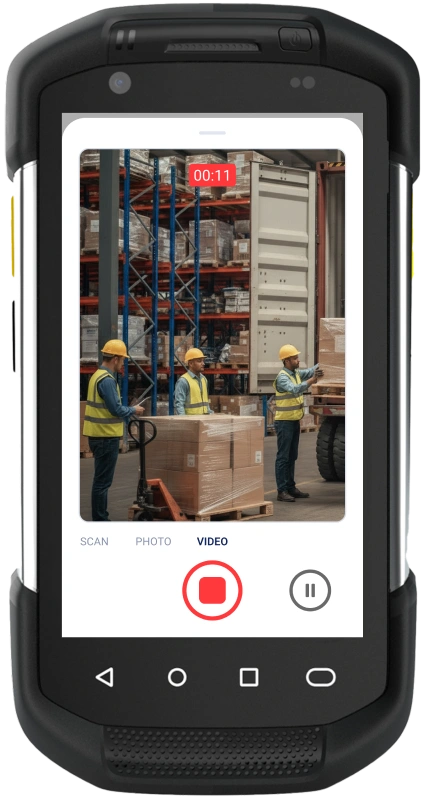
We’ve released a new AttachIT functionality in the WMS mobile app so teams can capture what’s really happening on the floor—right from their mobile devices.
- Capture media in context: Take photos and short videos of cargo directly from the mobile app while receiving, inspecting, or staging.
- Scan documents on the go: Use your device’s camera to scan paper documents (e.g., BOLs, invoices, packing lists) and attach them to the right cargo.
- Attachments in WMS: All images, videos, and scanned documents automatically appear under the Attachments tab of the related Warehouse Receipts and Packages, keeping everything in one place.
- Share through Supply Chain Portal: Your customers can view shared images, documents and short videos via the Supply Chain Portal, giving them real-time visibility into cargo condition and paperwork.
- Fewer disputes, faster answers: Visual proof and scanned docs reduce back-and-forth during claims, shortages, damages, and billing questions.
- Stronger collaboration: Operations, customer service, and customers all see the same visual/context history, improving trust and response times.
Example use case:
A 3PL receives cargo with visible carton damage. The receiver uses AttachIT to take photos and a short video of the pallet and scans the shipper’s documents. All files are linked to the Warehouse Receipt and shared through the Supply Chain Portal. When the customer calls, support can immediately see the images and paperwork, speeding up claims and preventing disputes over cargo condition at receipt.
Bookings — Reserve Space for Air, Ocean & Inland Moves
We’ve introduced Bookings so your team can reserve capacity and capture pre-shipment details before creating full shipments.
- Reserve space by mode: Create Air, Ocean, and Inland bookings to plan how cargo will move and secure space with your carriers ahead of time.
- Centralize pre-shipment info: Store key details such as customer, mode, dates, reference numbers, and basic cargo information in one booking record so everyone knows “what’s coming or going” before the shipment exists.
- Dedicated bookings list: View a central list of all bookings and search or sort by mode, customer, dates, references, and more to quickly find upcoming moves.
- Operational visibility: Use the bookings list as an early warning board for upcoming loads and capacity needs, giving sales, operations, and customer service a single source of truth.
- Permissions control: System administrators and users with admin rights can configure who can access the bookings list, ensuring that only the right users can view or manage sensitive planning data.
- Reduce last-minute chaos: By capturing bookings in a structured way, teams can better coordinate with carriers, avoid over-committing capacity, and reduce last-minute surprises when building shipments.
Example use case:
A forwarder confirms several pallets for an export customer over the next week. Instead of tracking everything in email, the operator creates an Ocean Booking in SCO with the rough volume, dates, and customer details. The booking appears on the central bookings list, so the team can plan container space and downstream tasks early, then later align actual shipments to that planned move.
Warehouse Workflows — Decision Trees
We’ve added Decision Trees in Warehouse Workflows so teams can model complex warehouse scenarios and guide users step-by-step.
- Branching logic per workflow: Configure multiple if/then paths inside a single workflow to reflect different handling rules, exceptions, or customer-specific processes.
- Scenario-based routing: Use decision trees to change the path based on data available to the workflow (e.g., cargo type, service level, customer, value, location, or status).
- More consistency, fewer mistakes: Teams follow the same guided path for each scenario, reducing manual judgment calls and training time.
- Better automation: Combine decision trees with existing workflow actions to automate notifications, task creation, field updates, and more, depending on the path taken.
This helps standardize how your WMS processes run—especially for operations with many special rules or high variability between customers.
Warehouse Workflows — Update Contact Fields
We’ve extended workflows so they can now update Contact data automatically when triggers fire.
- Update contact fields via triggers: Configure workflows to update contact fields (for example, pipeline stage status changes) when specific events occur.
- Supported today:
- Contact fields for Pipeline
- Custom fields for Contacts
- Cleaner CRM data: Automatically keep contact records in sync with operational events instead of relying on manual updates.
- Future expansion: Support for more entities such as Company, Quotes, Warehouse, Shipments, and others is coming soon, allowing even richer automation between operations and master data.
Enhancements
Custom Reports — Sums, Averages & Live Preview
We’ve made Custom Reports more powerful and easier to build.
- Sum calculations: You can now add sum aggregations (e.g., total weight, total charges, total pieces) to your custom reports for quick totals.
- Average calculations: Add average aggregations (e.g., average storage days, average charge per shipment) to monitor performance and cost trends.
- Real-time report preview: As you select datasets, fields, filters, and aggregations, the report preview updates in real time, so you can see how your report looks as you build it.
- Less trial and error: The live preview reduces the need to constantly save and re-open reports, making it much faster to design reliable operational and management dashboards.
Warehouse Management System
We’ve delivered several WMS improvements to make daily work more traceable, accurate, and user-friendly.
Activities Tab on Warehouse Receipts
- New Activities tab on Warehouse Receipts: Track updates and changes made to the General tab, giving you a clear audit trail of who changed what and when.
- Future coverage: In upcoming releases, more changes across the Warehouse Receipt will be captured here, turning the Activities tab into a full, time-ordered history of the WR.
Better Cargo Selection from Inventory
- Filters no longer reset: When adding cargo from inventory to a Shipment, Cargo Release, or Pickup & Delivery, the filters you applied will no longer reset after adding cargo, saving rework when adding multiple items.
- Filter by custom fields: When adding cargo from inventory to Shipments, users can now filter by custom fields, making it easier to find very specific cargo (e.g., by project, lane, or internal tags).
Charges & Payment Methods
- More payment options: Under the Charges tab, we’ve added additional payment methods: Credit Card, Zelle, and Cash.
- Clearer billing workflows: These additional options help teams record how charges are paid in a way that matches real-world payment methods used by customers.
Location Assignment Improvements
- Smart location search: When assigning a location to a package, users can now search for locations, and the system will auto-suggest matching locations as they type.
- Faster putaway & moves: This reduces manual scrolling and decreases errors when selecting locations, especially in large warehouses with many locations.
Support for Special Characters in Pro/Tracking Numbers
- Flexible identifiers: When entering Pro Numbers or Tracking Numbers anywhere in the system, you can now use special characters such as pound (#), asterisk (*), and dash (-).
- Match carrier formats: This lets you capture reference numbers exactly as carriers and partners use them, improving searchability and reducing mismatches.
Custom Fields in Cargo Release & Pickup & Delivery Lists
- More visibility on lists: Users can now view, search, and sort by Custom Fields in the Cargo Release and Pickup & Delivery lists.
- Better operational filters: This makes it easier to manage work based on internal tags (e.g., priority, route, project, service level) and align operations with your own data model.
Other Product Updates & Release Notes
